
One Slack thread per Jira ticket
Bidirectional sync of edits, attachments, mentions. The conversations integration, not notifications.
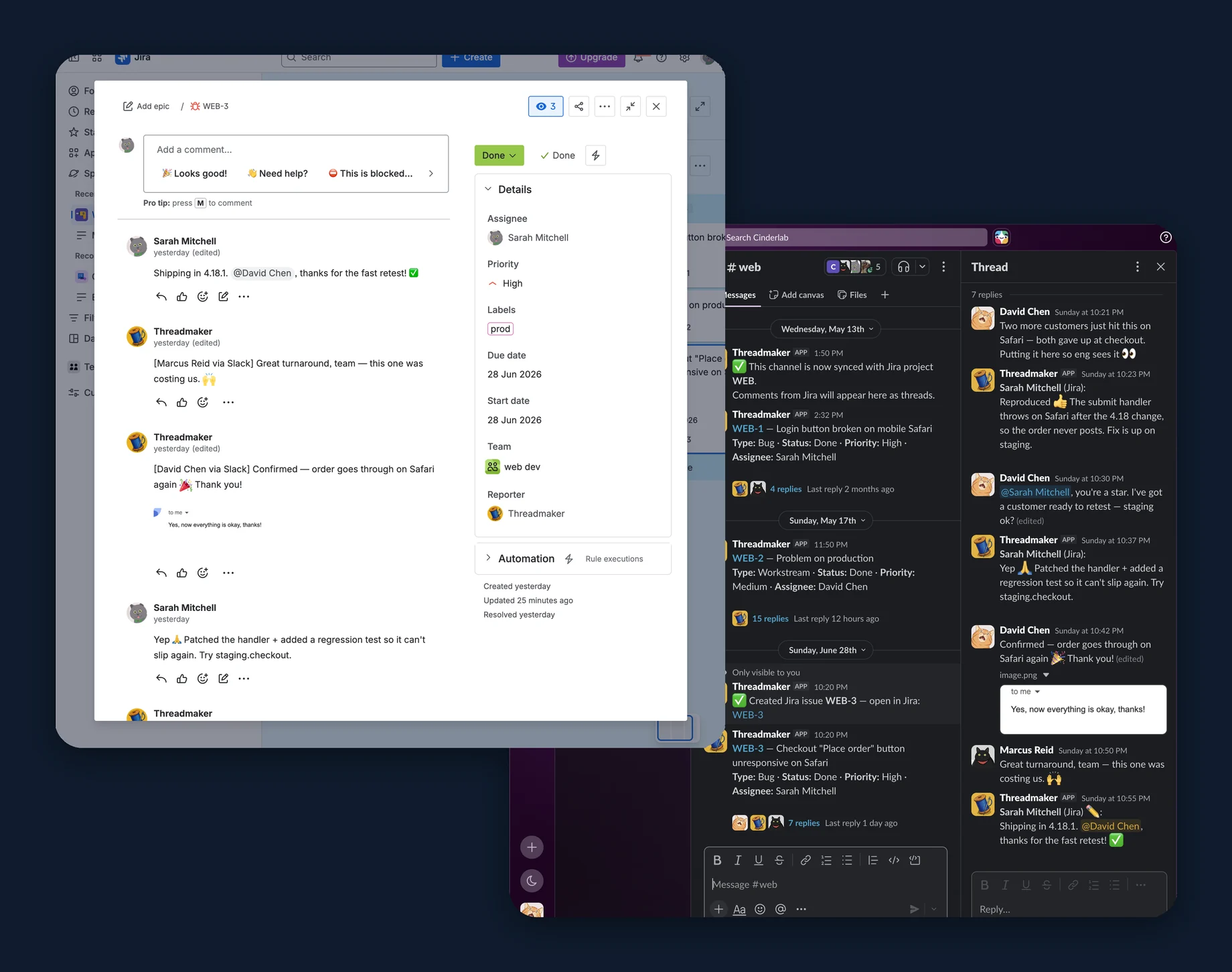
Map a channel to a Jira project. Every ticket gets its own thread. Comments sync both ways — with edits, attachments, and mentions intact.
Free for up to 10 Jira users · Cancel anytime · No credit card required
Why Threadmaker
Notifications tell you what happened. Conversations let you respond.
By Friday, no one remembers what was decided.
Most Jira-Slack integrations push a notification when something changes. Your team reads it, talks about it in a separate channel, and the discussion never makes it back to the ticket. Threadmaker gives every ticket its own Slack thread — and the conversation lands on it automatically.
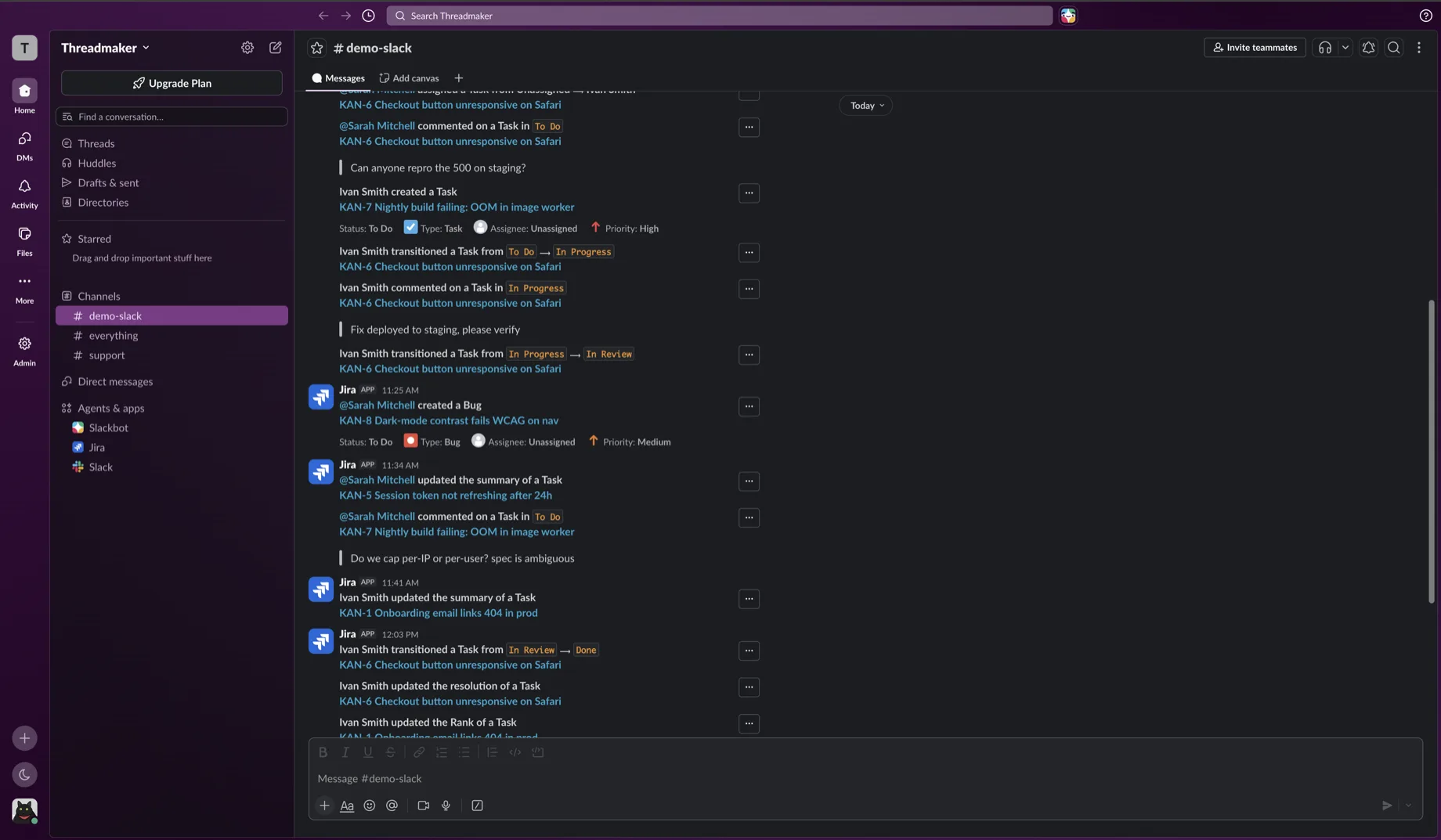 The default Jira→Slack firehose: disconnected, one-way cards.
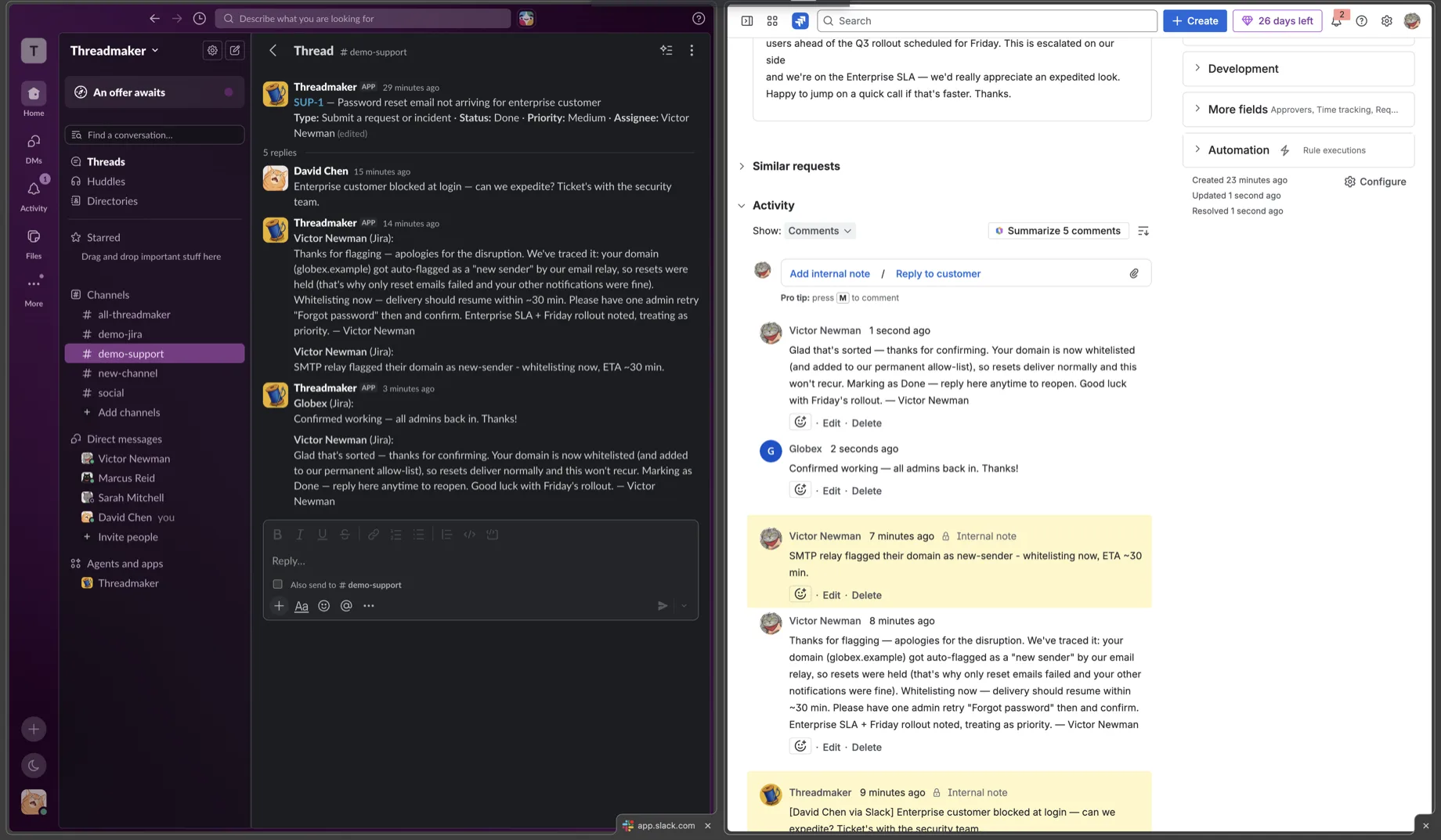 Threadmaker: one thread per ticket — replies sync both ways, even in JSM.
Three steps. Under ten minutes.
From install to first synced comment.
Install both apps
You add Threadmaker to Slack from this page and install the Jira app from the Atlassian Marketplace, then paste the connection token from Slack into Jira admin once. Two windows; no API tokens to manage.
Map a channel to a project
A workspace admin runs /jira-map in any public or private Slack channel and picks a Jira project. The bot needs a member-invite either way (Slack rule, not ours).
Start working
Every new ticket gets its own Slack thread. Replies sync both ways, usually within seconds — edits, deletes, attachments, and mentions all intact. Your team writes on the side they're already on.
Want every detail? There's a full step-by-step setup guide — with screenshots and a look at the per-project settings.
What you get
Built for the way your team already works.
Bidirectional comment sync
Replies in Slack become Jira comments. Comments in Jira appear in the right Slack thread. No double-posts, no echo loops.
Edits and deletes sync both ways
Fix a typo in Jira; the Slack thread updates to match, usually within seconds. Delete a wrong comment in Slack; it disappears from the ticket too. Even an image added while editing follows along. Both sides stay clean.
Inline images and attachments
Drop a screenshot in Slack; it renders inline inside the Jira comment body — not just in the attachments tab. Any file type syncs, up to 3.5 MB per file.
Anchor messages stay live
Status changes in Jira show up in the Slack thread automatically. No stale "is this still in progress?" pings — the header re-renders the moment Type, Status, Priority, Summary, or Assignee change.
Create issues — and JSM requests — from Slack
Run /jira-create in a mapped channel. On a Software or Business project it files an issue. On a Jira Service Management desk it files a customer request in the chosen request type — portal- and agent-queue-visible, with the app as reporter — and internal agent comments stay off the public Slack thread.
@-mentions cross the boundary
An @mention in Slack becomes a real Jira ping when the two accounts share an email — and the same the other way. No email match? It falls back to a readable name rather than a raw ID.
Forward any message to the ticket
A stray message that belongs on a ticket? In a mapped channel, right-click it and pick Send to Jira. It lands as a comment on an issue in that channel's project — and when the ticket already has a Slack thread, a "↪ Forwarded from #channel" copy drops into that thread, so everyone following the ticket sees the context too.
Reactions become Jira signals
React with an emoji on a synced message and Threadmaker posts a lightweight comment on the ticket, attributed to you; remove the reaction and it's gone. Off by default — turn it on per project when you want reactions to count.
How we stack up
Here's where we win, and where we don't.
Jira Cloud for Slack is the official free option. Unito is the multi-tool generalist. Threadmaker is the one built around the conversation — every ticket gets its own Slack thread, synced both ways, with edits, deletes, attachments, and mentions kept intact.
| Capability | Threadmaker | Jira Cloud for Slack (Atlassian official) | Unito (2-way sync) |
|---|---|---|---|
| One Slack thread per ticket, auto-created | Yes | Auto + manual to any issue | No record-level |
| Slack replies become Jira comments | Yes any project | Thread sync; 2-way in JSM | Yes — ~5 min |
| Create Jira issues + JSM requests from Slack | Yes std projects + JSM requests | Issue + JSM requests | Issue + JSM issue create |
| Edits and deletes sync both ways | Yes | No | Edits ~5 min |
| Attachment binary sync, both directions | 3.5 MB / file | No | Link-mapped, no binary |
| Inline image rendering in Jira comments | Yes | No | No |
| Mention mapping (@user ↔ @user) | Yes | Assign-by-name; no pill | Record-level |
| Live anchor (status / assignee re-renders) | Yes | Editable card, manual refresh | No |
| Channel ↔ project mapping | Yes admin /jira-map | Channel↔project subs | Yes |
| Sync audit log | 90 days | No Jira-native only | Yes |
| Pricing (50-user team, entry tier) | $75 / mo 50 × $1.50 · all features | Free core sync, no advanced | Item-metered not per-user |
Jira Cloud for Slack is the free official pick if you live in JSM or mainly need notifications and basic sync. Unito is the multi-tool choice for syncing records across many apps. If you need the conversation to land on the ticket — both ways, edits, attachments and all — that's what Threadmaker is built for.
Comparison based on each product's public documentation as of July 2026.
Full comparisons: Threadmaker vs Jira Cloud for Slack · Threadmaker vs Unito · Threadmaker vs ClearFeed
Built for your team
Three teams, one pattern.
Engineering triage
You file bugs in Jira and triage them in Slack. Threads stay open; tickets accumulate the discussion automatically. No more "hey, did you see this?" chase messages.
Triage: discussion lands on the ticket Engineering-triage playbook →Customer support escalation
You escalate to engineering in-thread. The Jira ticket accumulates the diagnostic trail without anyone retyping context. Engineers stay in Slack; the audit trail builds itself.
Handoff: from a chase, to a thread Support-escalation playbook →On-call & incident response
You jump into the war-room channel. The anchor message tracks status / assignee / priority live. After the incident, the thread IS the postmortem — Jira is the durable copy.
Postmortem: the thread is the write-up Incident-response playbook →Pricing
Start free. Pay only on the Jira side.
The Slack app is free, forever. Pay per Jira user — billed by Atlassian Marketplace, not us.
Free
For small teams getting started.
Up to 10 users
All features. Forever.
Team
A 50-person team.
50 users
$1.50 per user
Business
A 250-person org.
250 users
effective $1.32 per user
Scale
Volume pricing, no negotiation.
1,000 users
effective $1.00 per user
Rates are marginal: each band of seats is charged at its own rate, so your effective price per user is always below the headline one. It starts at $1.50 per user and keeps stepping down as your team grows — the first 10 users are always free. Annual billing costs 10× the monthly rate, so two months are free. Every tier includes every feature: bidirectional sync, edits/deletes, attachments, mention mapping, audit logs, GDPR-compliant DPA. The Slack app is always free; pricing applies to Jira-side users only. Billing runs through the Atlassian Marketplace, which is the authoritative source for current prices.
Security & trust
Built on Atlassian's Forge. Hosted on Cloudflare.
Forge-native
All Jira operations run inside Atlassian's Forge runtime under your tenant. We never store Jira API tokens.
Encrypted
TLS 1.2+ in transit, AES-256 at rest in Cloudflare D1. HMAC-signed internal RPC.
Audit log, 90 days
Every sync event recorded for 90 days. Workspace admins read the channel's recent sync events (the most recent, up to 50) with /jira-audit.
GDPR-ready
EU-US Data Privacy Framework + Standard Contractual Clauses for US transfers, DPA on request, 30-day DSR SLA. Privacy Policy.
Common questions
Things buyers ask before clicking install
Can I uninstall cleanly without losing data?
- Uninstall from Slack — your backend data
(workspace records, mappings) is deleted automatically on the
app_uninstalledevent, typically within minutes; a 30-day SLA upper bound covers any retry-window delay, per Privacy Policy §4.2. - Uninstall from Jira — sync stops immediately. Atlassian sends no uninstall webhook, so Jira-derived config and channel mappings are auto-cleared after ~30 days of confirmed disconnection (with prior warnings); Slack-side data remains until the Slack app is also uninstalled.
dpo@threadmaker.dev with subject "Data
deletion request".
How does pricing work?
What if Slack or Jira is briefly down?
/jira-audit). The
queue is per-tenant, so a noisy neighbor can't starve your
delivery. See troubleshooting
for the common failure modes.
How large can attachments be?
Is my data shared with anyone?
Ready to bring the conversation to the ticket?
Free for up to 10 Jira users. Under ten minutes from install to first synced comment.
Cancel anytime · No credit card · Read the docs first